
Aadhaar Download 2026– The Aadhaar card is a 12-digit unique identification number issued by the Government of India, serving as a key document for identity and address verification. In this article, you’ll learn how to download your Aadhaar card easily using multiple official methods, including the UIDAI portal, mAadhaar app, and DigiLocker.
Download Aadhaar Card
Download your official Aadhaar card online. Get instant access to e-Aadhaar.
What is e-Aadhaar?
The e-Aadhaar is a digital, password-protected version of your Aadhaar card issued by the Unique Identification Authority of India (UIDAI). It contains all the details found on your physical Aadhaar — including your 12-digit number, name, address, gender, date of birth, and photo — and is digitally signed by UIDAI.
Legal Validity: As per the Aadhaar Act 2016, e-Aadhaar is equally valid as the physical Aadhaar card and accepted across India for both government and private services.
You can download:
- Regular Aadhaar: Displays the full 12-digit number.
- Masked Aadhaar: Shows only the last 4 digits for privacy protection.
Password Format:
The PDF is password-protected. The password = first four letters of your name (in uppercase) + year of birth.
Example: Priya (born in 1990) → PRIY1990.
Prerequisites for Aadhaar Download
To e Aadhaar download, make sure you have:
- Aadhaar Number (UID), Enrolment ID (EID), or Virtual ID (VID)
- Registered Mobile Number (to receive OTP)
- Stable Internet Connection
- PDF Reader (e.g., Adobe Acrobat, Microsoft Edge)
If your mobile number is not registered, visit the nearest Aadhaar Seva Kendra (ASK) for assistance.
How To Download Aadhaar Card Online 2025?
Here are the simple and easy steps to Aadhaar Card Download:
1. Through the UIDAI Website (myAadhaar Portal)
The myAadhaar portal is the primary and most secure method to e Aadhaar card download.
Steps:
- Go to https://myaadhaar.uidai.gov.in
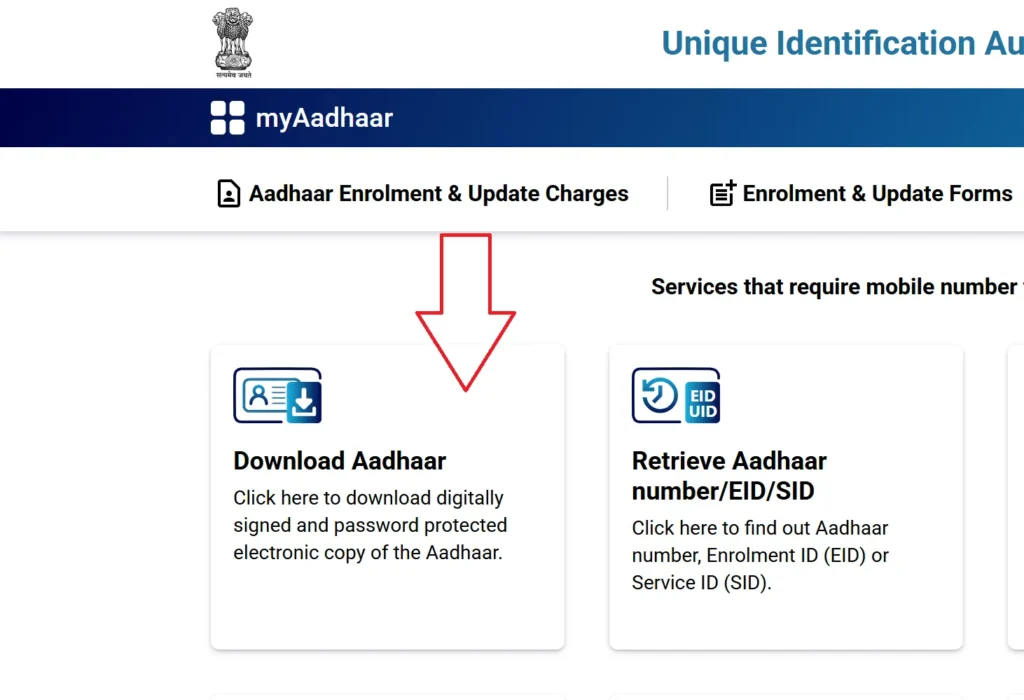
- Click “Download Aadhaar” under “My Aadhaar.”
- Choose one of the identifiers:
- Aadhaar Number
- Enrolment ID (EID)
- Virtual ID (VID)
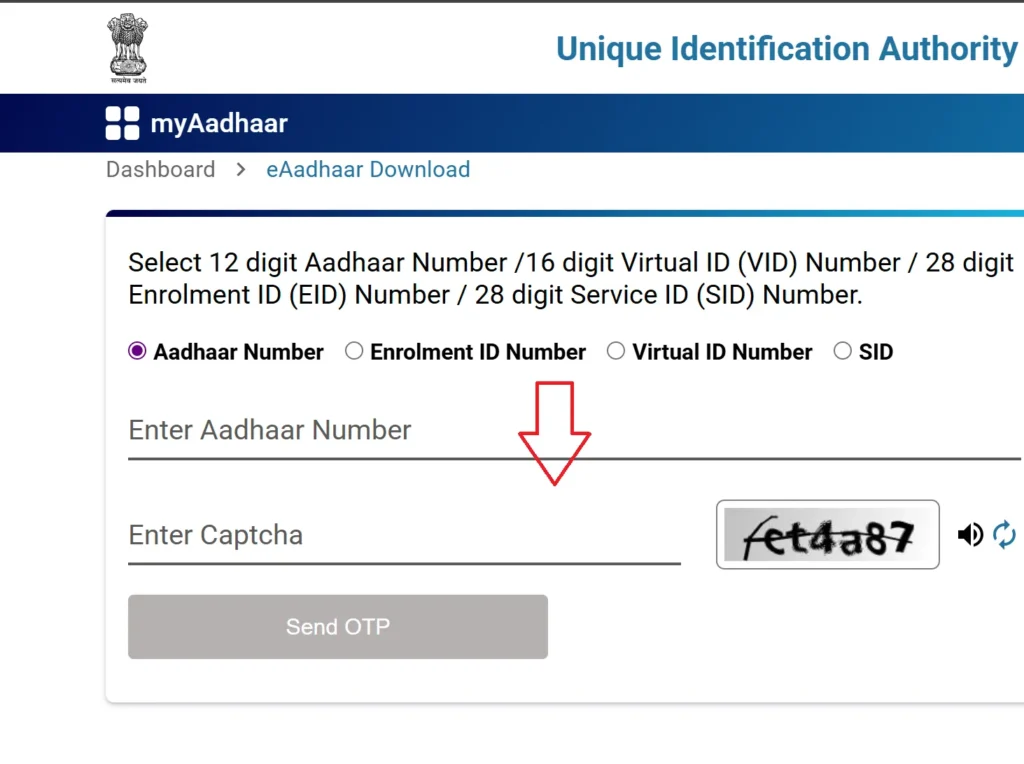
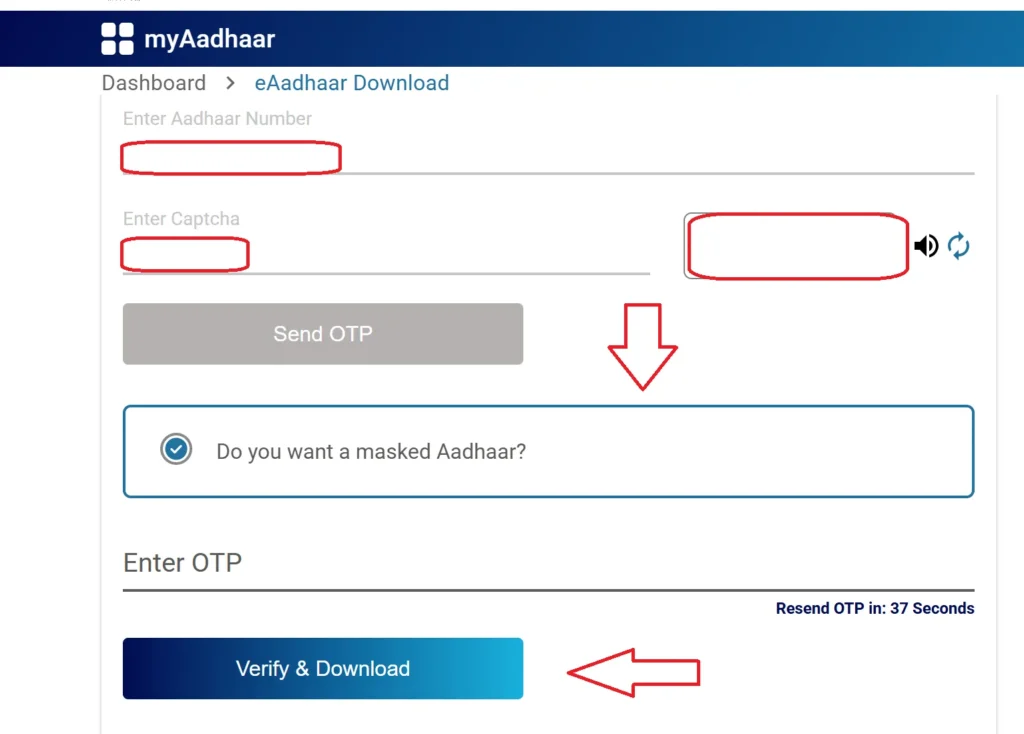
- Enter the captcha and click “Send OTP.”
- Choose Regular or Masked Aadhaar.
- Enter OTP → Click “Verify & Download.”
- Open the downloaded PDF using your password (e.g., RAHU1990).
Note: If you’ve updated any details recently, your e-Aadhaar will reflect the latest information.
2. Using the mAadhaar App (Android/iOS)
The mAadhaar app, developed by UIDAI, allows you to manage and download Aadhaar securely on your smartphone.
Steps:
- Install the mAadhaar app from Play Store or App Store.
- Choose your preferred language.
- Log in using your registered mobile number and verify via OTP.
- Tap “Download Aadhaar” under “Get Aadhaar.”
- Select Regular or Masked Aadhaar.
- Enter your Aadhaar, EID, or VID → Generate OTP/TOTP.
- Verify and download your e-Aadhaar PDF.
Other mAadhaar features:
Lock/unlock biometrics, verify Aadhaar, order PVC card, and update address.
3. Download via DigiLocker
DigiLocker, a government cloud platform, is integrated with UIDAI for secure Aadhaar downloads.
Steps:
- Visit https://digilocker.gov.in or open the app.
- Sign in using your mobile number, Aadhaar, or username.
- Search for “UIDAI” → Select “Aadhaar”.
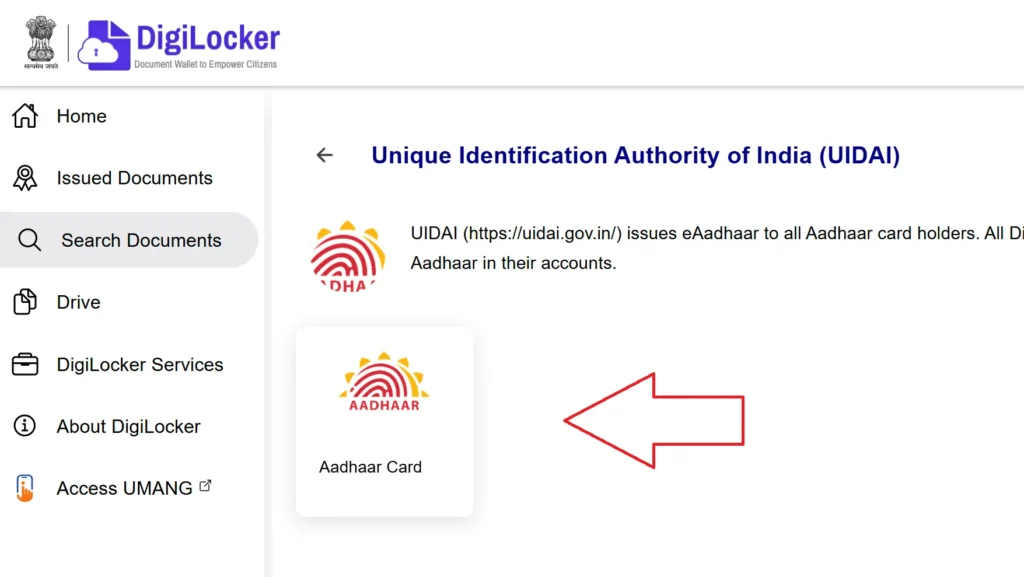
- Enter your Aadhaar number and verify via OTP.
- The e-Aadhaar will appear in your Issued Documents.
- Click the download icon to save the file.

4. Retrieve Aadhaar Using Name and Date of Birth
If you’ve lost your Aadhaar or EID:
- Go to the my uidai aadhar portal.
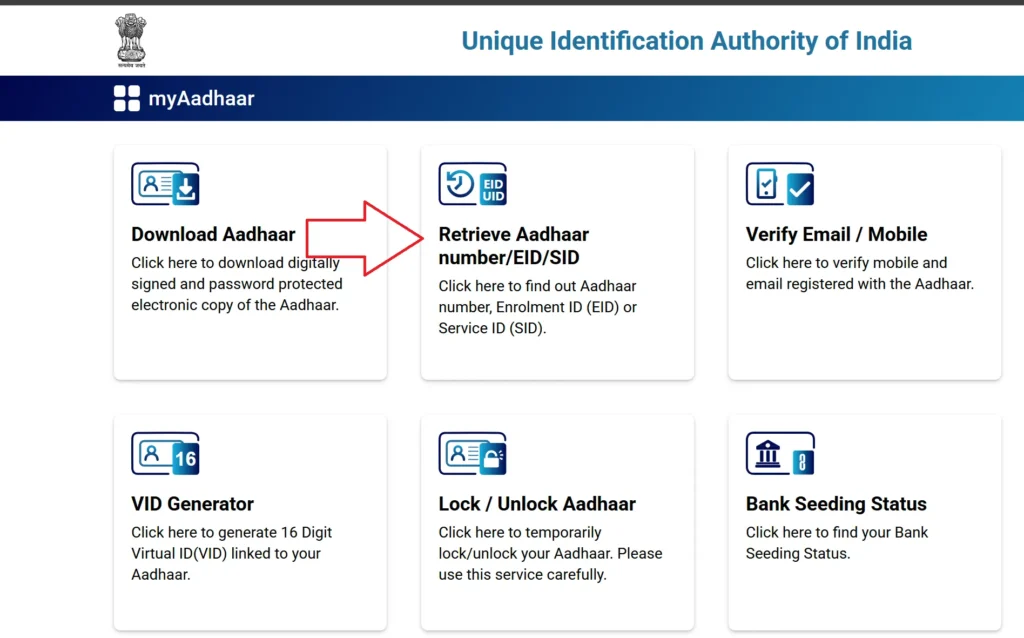
- Select “Retrieve EID/Aadhaar Number.”
- Enter your name, DOB, and registered mobile/email.
- Complete CAPTCHA → Click Send OTP.
- After verification, you’ll receive your Aadhaar or EID on your mobile/email.
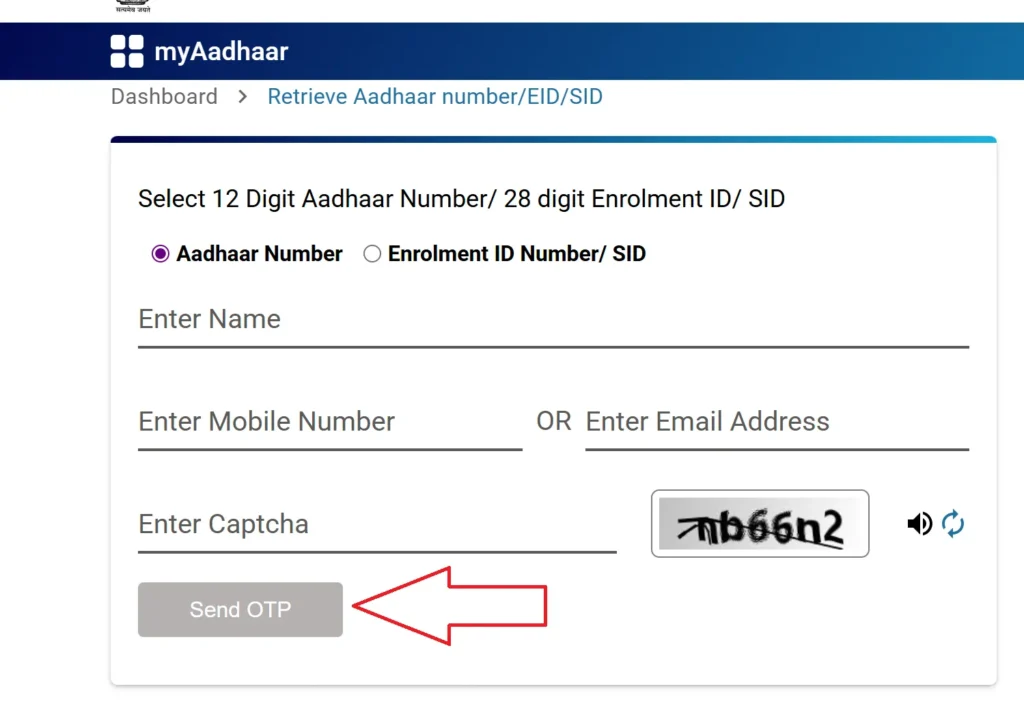
- Use it to download your e-Aadhaar via the UIDAI website.
5. Without Registered Mobile Number
If your mobile number is not linked:
- Visit the nearest Aadhaar Seva Kendra.
- Provide biometric verification (fingerprint or iris).
- Carry a valid ID proof (PAN, Voter ID, etc.).
- Request a printout of your Aadhaar for ₹30 (normal) or ₹50 (PVC card).
Printing e-Aadhaar
To use e-Aadhaar physically:
- Open the PDF in a reader.
- Enter the password (Name + Birth Year).
- Select Print → Your printed e-Aadhaar is equally valid as the original.
Masked Aadhaar: Secure Your Privacy
Masked Aadhaar hides the first eight digits of your Aadhaar number (e.g., XXXX XXXX 1234), ensuring greater privacy.
Key Features:
- Protects identity during document sharing (e.g., KYC, rentals, job applications).
- Fully valid under the Aadhaar Act 2016.
- Includes name, address, photo, QR code, and other details.
- Free to download via the UIDAI portal.
Masked Aadhaar Download Online Procedure:
Here are the steps to mask Aadhaar download online:
- Visit https://myaadhaar.uidai.gov.in/.
- Click “Download Aadhaar.” to uidai aadhaar download.
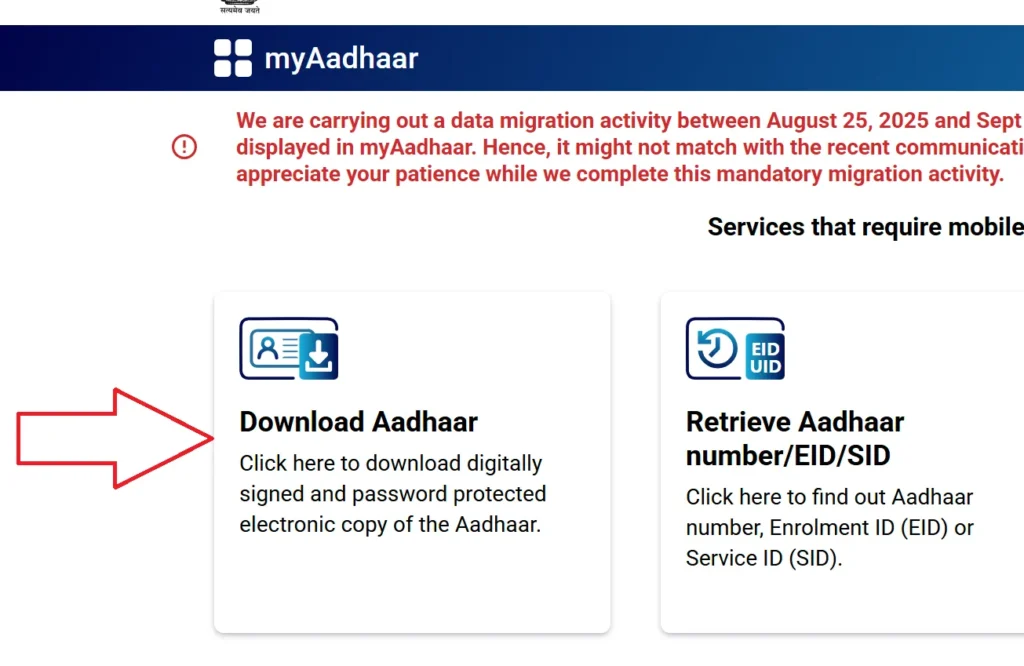
- Enter Aadhaar or VID and CAPTCHA.
- Select “Do you want a masked Aadhaar?” → Yes.
- Verify OTP → Click “Verify & Download.”
UIDAI Support
For queries or issues:
- Helpline: 1947
- Website:https://uidai.gov.in
- Visit the nearest Aadhaar Seva Kendra
FAQs: Aadhaar Download
You can download your Aadhaar card online from the official UIDAI myAadhaar portal by using the official website, your Aadhaar number, Enrolment ID (EID), or Virtual ID (VID). Simply verify with OTP and download the password-protected PDF.
Yes. As per the Aadhaar Act 2016, the e-Aadhaar is legally valid and accepted as proof of identity and address for all government and private services across India.