
The My UIDAI Aadhaar Portal provides you with all the important services related to your Aadhaar card in one place. The most useful service among these is checking Aadhaar status. Whether you have a new Aadhaar or have updated it (name, address, mobile number, etc.), you can now check your Aadhaar update online in just a few seconds through the official UIDAI website.
Through this page, you can easily get all the information like Aadhaar Enrollment Status, Update Request Status, PVC Card Order and Aadhaar Download Status. This entire process is secure, simple and completely digital.
Aadhaar Enrolment & Update Status
Check your Aadhaar enrolment status and track updates.
What Is Aadhaar Status?
Aadhaar update Status refers to the current status of your Aadhaar application or update. When you apply for or make any changes to your Aadhaar, UIDAI verifies it. After this process, you can check online whether:
- Whether your Aadhaar number has been generated or not
- Whether your update request is in process or completed
- Whether the PVC card you ordered has been shipped
How to Check Aadhaar Status?
- First, open the official UIDAI website from your mobile or computer:
- On the home page, you’ll find the option “Check Aadhar Card Status” or “Check Enrollment/Update Status.”
- Click on it.
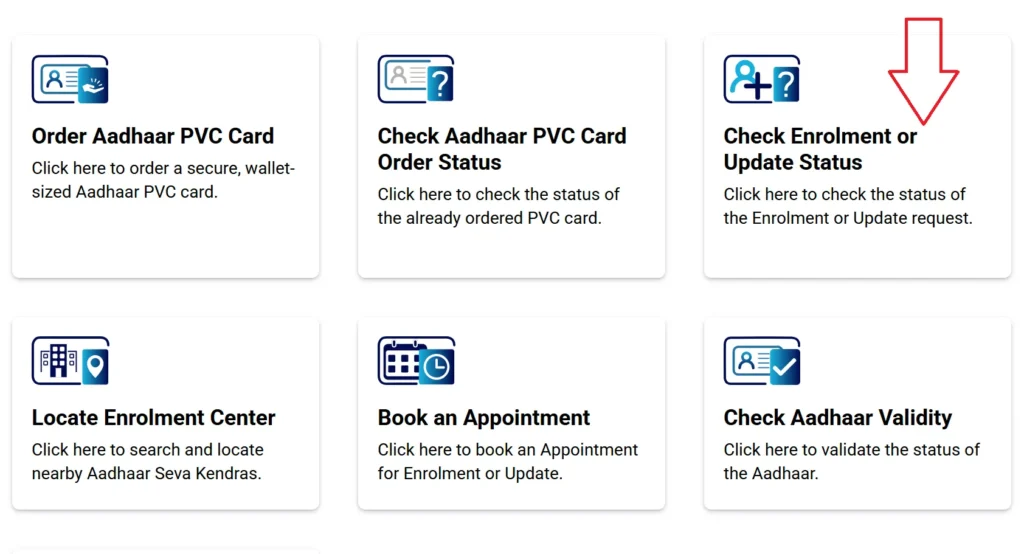
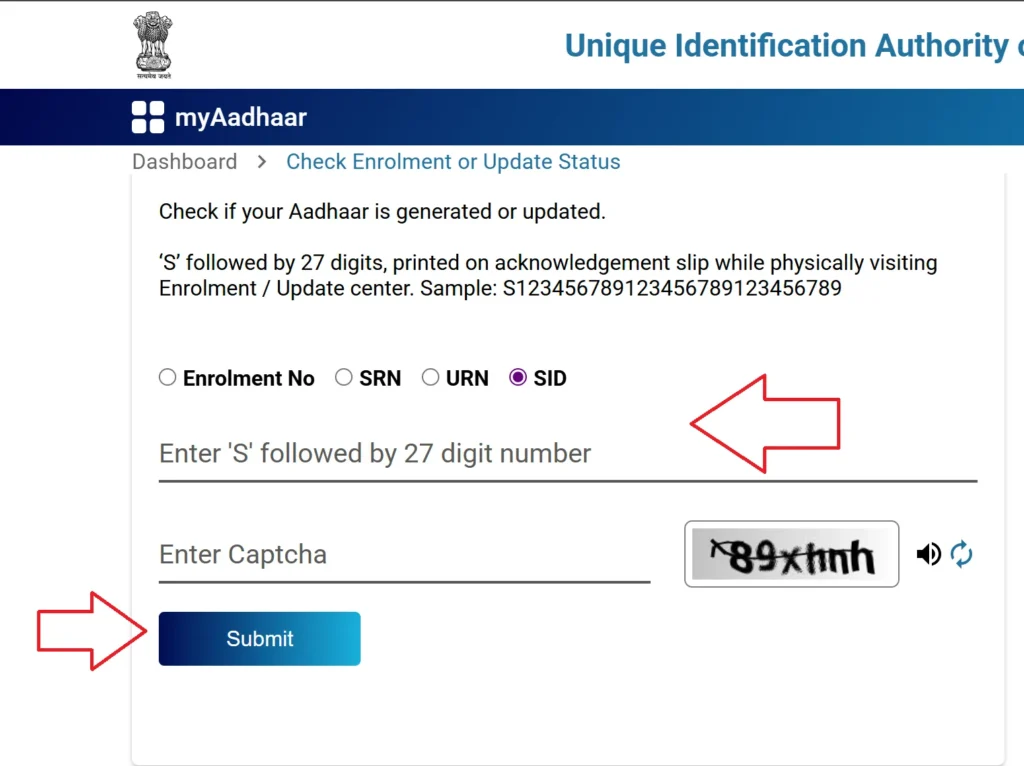
- Now, you’ll need to enter your Enrollment ID (EID) or Update Request Number (URN).
- The Enrollment ID is listed on your Aadhaar enrollment slip (e.g., 1234/56789/12345).
- The Update Request Number (URN) is obtained when you update your Aadhaar.
- Now, enter the captcha code displayed on the screen correctly.
- Click the “Check Aadhaar Status” button.
- In a few seconds, your Aadhar card status will appear on the screen:
- Aadhaar Generated: Your Aadhaar has been generated.
- In Process: Your application is currently being processed.
- Dispatched: Your Aadhaar or PVC card has been dispatched.
- Rejected/On Hold: The application has been held up or rejected due to an error.
How to Check Aadhaar PVC Card Order Status?
- First, open the UIDAI website https://myaadhaar.uidai.gov.in on your mobile or computer
- Go to the “My Aadhaar” section on the homepage and select the “Check Aadhaar PVC Card Status” option.
- When you ordered your PVC card, UIDAI provided you with an SRN (Service Request Number).
- This is a 28-digit number that is sent to your order receipt or SMS/Email.
- Enter the captcha code displayed on the screen correctly to complete the verification.
- Now click the “Check Status” button.
- In a few seconds, the complete status of your PVC card order will appear on the screen.
- In the status report, you will see the following details:
- Order Received: Your order has been successfully received.
- Printing Stage: Your PVC card is being printed.
- Dispatched: The card has been sent to India Post.
- Delivered: Your card has reached your address.
- AWB Number: This is the Speed Post tracking number, through which you can also track the delivery status of your card from the post office website.
Benefits Of Online Status Check
- Checking your Aadhar card status online eliminates the need to visit an Aadhaar centre or post office. You can find out whether your Aadhaar has been generated in just a few seconds using your mobile or computer.
- You can check your status from anywhere and at any time through the UIDAI website. This entire process is available 24×7—meaning you can check your status whenever you want, day or night.
- Checking your status increases the transparency of the Aadhaar process. You get information at every step: whether your application has been received, whether processing is ongoing or complete, and whether your card has been dispatched.
- With data coming directly from UIDAI servers, you get accurate information in real time. There’s no need for a third party or agent.
- UIDAI uses OTP and CAPTCHA-based security when checking your Aadhaar status. This ensures your personal information is completely secure.
- If you have ordered an Aadhaar PVC Card, you can also easily check its delivery status when it was printed, when it was dispatched, and when it was delivered.
- If your application is held up due to an error or an incomplete document, checking the status will provide you with instant information. This will help you reapply correctly.
- There is no fee for checking your Aadhaar status. This facility is made available free of charge by UIDAI to all citizens.
- This facility strengthens the Government of India’s Digital India initiative by enabling people to access government services online without hassle.
- UIDAI has made this service available on both the website and mobile, making it easily accessible to anyone, whether from rural or urban areas.
FAQ For Aadhar Card Status
Visit the Income Tax Department website www.incometax.gov.in, open the “Link Aadhar card Status” section, enter the PAN and Aadhaar number, and click on “View Link Status”.
Select the “Check Aadhaar-Bank Seeding Status” option on the UIDAI website, enter your Aadhaar number and captcha, and verify the OTP. The bank link status will be displayed immediately.
Open the MyAadhaar website, click on “Check Aadhaar Status”, enter the Enrollment ID and captcha, and check the Aadhar card status to see if Aadhaar has been generated.
Click on “Check Aadhaar Update Status” on the UIDAI website, enter your Update Request Number (URN) and captcha, and press “Check Status.” You will see whether the update is complete or pending.