
The Aadhaar Card, issued by the Unique Identification Authority of India (UIDAI), is a 12-digit unique identity number linked with an individual’s biometric and demographic details. It serves as one of the most important identity documents in India.
The e-Aadhaar is a digitally signed, password-protected PDF copy of your Aadhaar card. It is legally valid under the Aadhaar Act and can be used just like the physical card for all official purposes.
Download Aadhaar Card
Download your official Aadhaar card online. Get instant access to e-Aadhaar.
Check Aadhaar Enrolment or Update Status
You can track your Aadhaar:
- New enrolment status
- Aadhaar update application status
- PVC card order status
All these can be checked online via UIDAI services.
Aadhar Card Download– Basic Requirement
To download your Aadhaar, you need:
- Registered 10-digit mobile number
- Access to OTP verification
Methods for Online Aadhar Card Download
UIDAI provides four secure methods to download your e-Aadhaar, all of which require OTP authentication.
1. Download Aadhaar via UIDAI MyAadhaar Portal
This is the most reliable and official method.
Steps to Download:
- Visit uidai.gov.in
- Go to My Aadhaar → Download Aadhaar
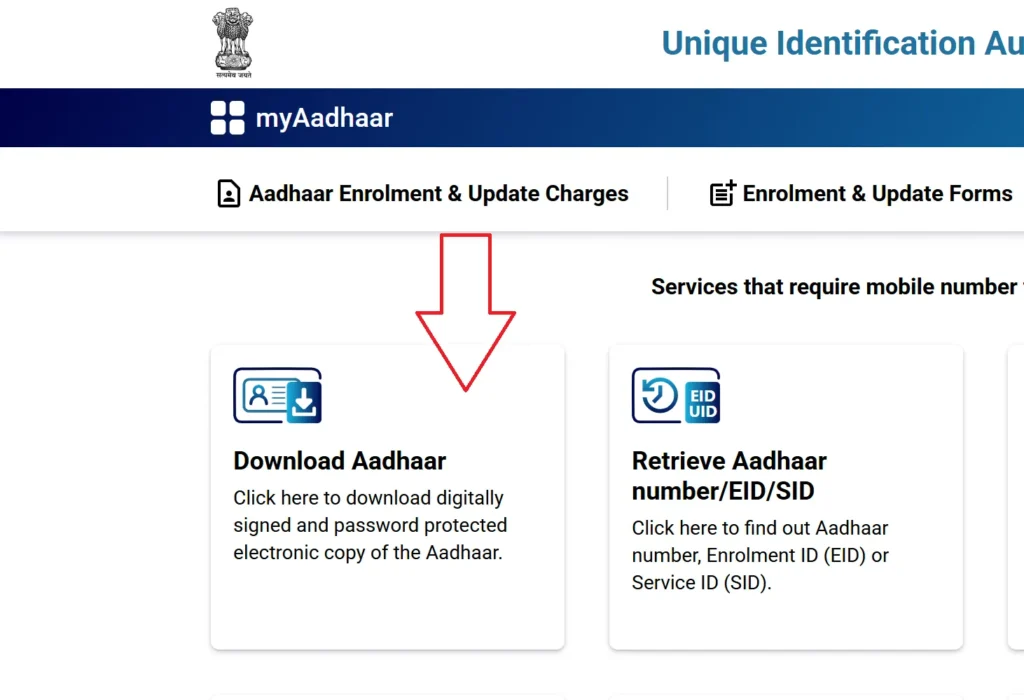
- Choose one of the following:
- Aadhaar Number (12 digits)
- Enrolment ID – EID (28 digits)
- Virtual ID – VID (16 digits)
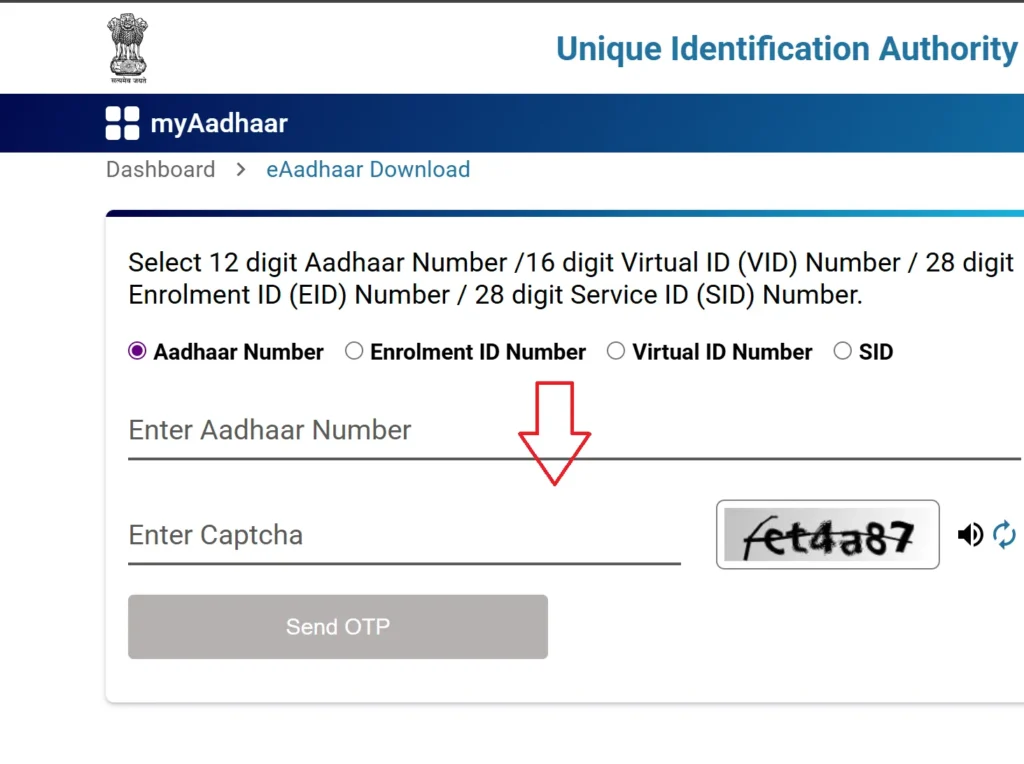
- Complete the captcha
- Click on Send OTP
- Enter the OTP received on your registered mobile
- Choose Masked Aadhaar (optional)
- Click Verify & Download
- Your e-Aadhaar PDF will be downloaded
This is the recommended method by UIDAI.
2. My Aadhar Card Download Using Maadhaar App
The mAadhaar App is available for both Android and iOS.
Steps:
- Install the app from the Google Play Store or App Store
- Register using your mobile number
- Verify using OTP
- Select Aadhaar Download
- Choose:
- Regular Aadhaar
- Masked Aadhaar
- Enter Aadhaar number / VID / EID
- Verify OTP
- Download your e-Aadhaar PDF
Additional Features of mAadhaar App:
- Retrieve Aadhaar/VID
- Generate Virtual ID
- Check Aadhaar validity
- Order PVC Card
- Track PVC status
- View authentication history
- Add up to 3 family profiles
3. Aadhar Card Download Online through Digilocker
DigiLocker allows you to store and access Aadhaar along with other government documents.
Steps:
- Visit digilocker.gov.in or install the DigiLocker app
- Log in using your mobile number or Aadhaar
- Go to Search Documents
- Select UIDAI Aadhaar Card
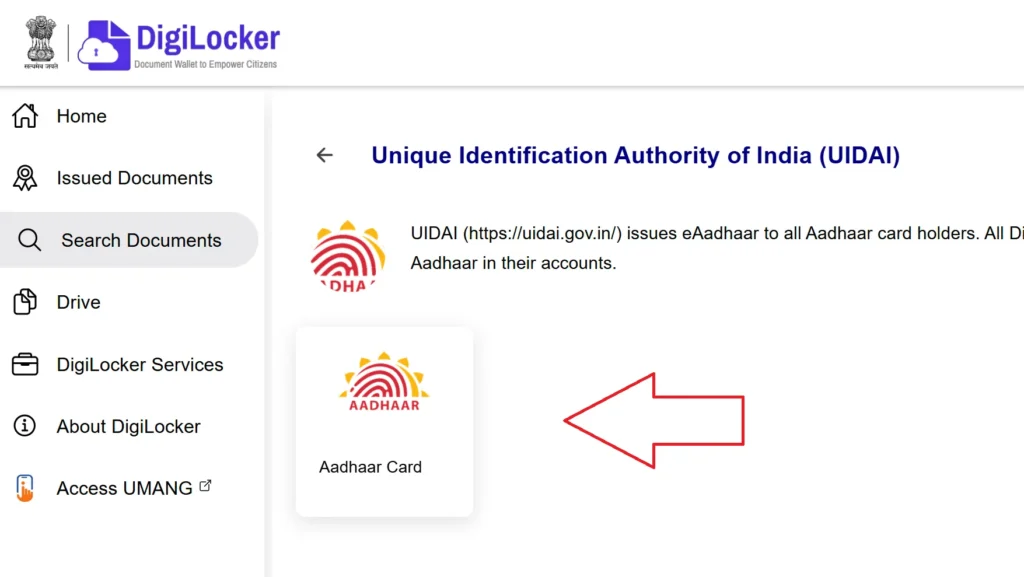
- Enter Aadhaar number
- Verify via OTP
- Aadhaar appears in Issued Documents
- Download your Aadhaar anytime

Best option for users already using DigiLocker.
4. Download Aadhaar via UMANG Portal
UMANG provides access to many government services, including Aadhaar download.
Steps:
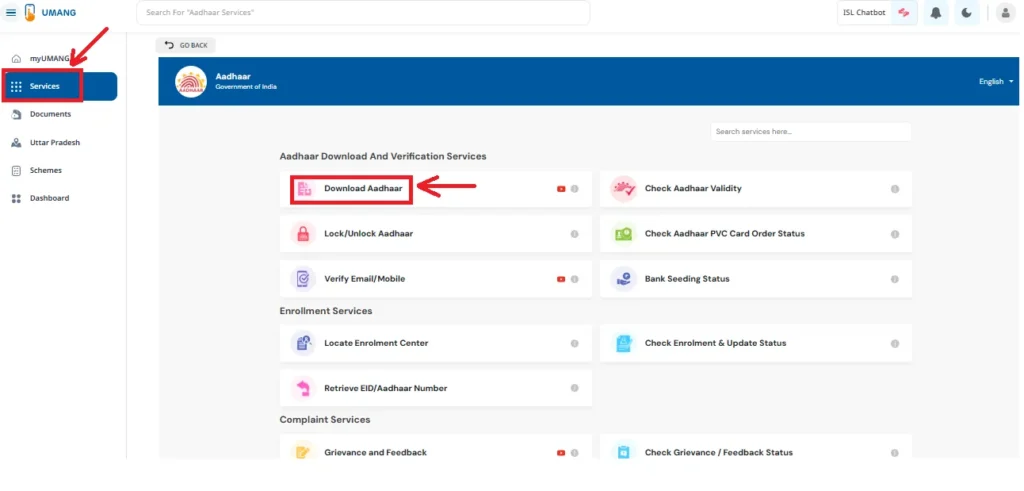
- Visit web.umang.gov.in or install the UMANG App
- Log in using your mobile number or email
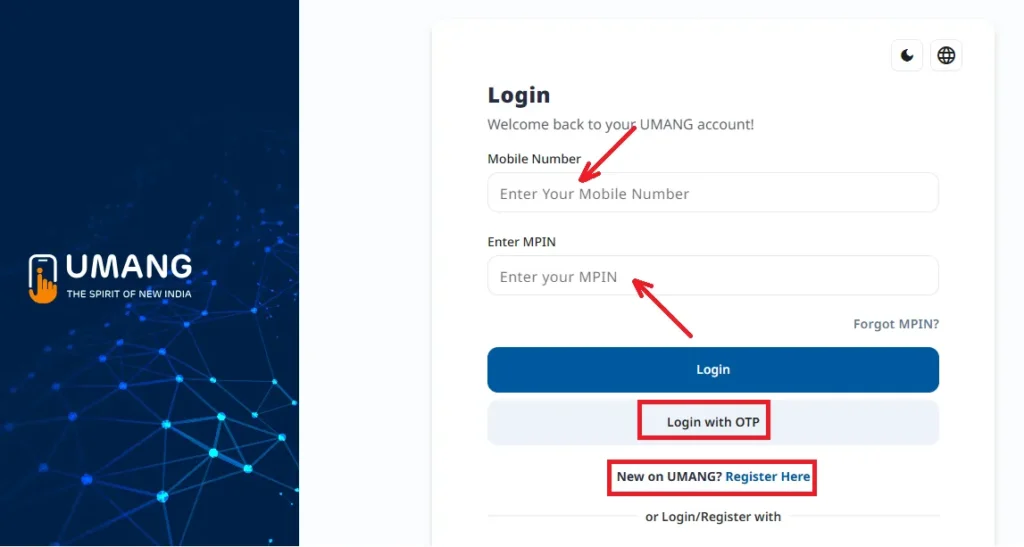
- Go to Services → UIDAI → Download Aadhaar
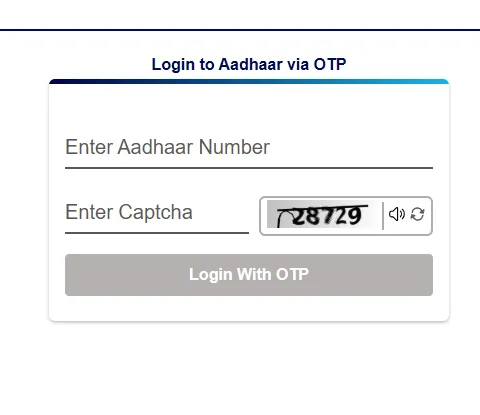
- Enter Aadhaar number
- Verify OTP
- Click “Download” to download your e-Aadhaar as a PDF.
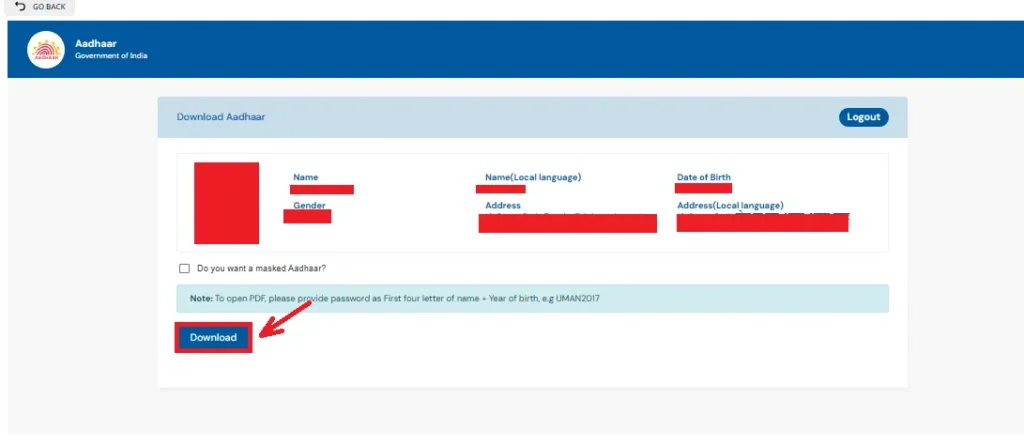
e-Aadhaar PDF Password
Your downloaded Aadhaar PDF is password-protected:
Password Format:
- First 4 letters of your name (in CAPITAL)
- Followed by your birth year
Example:
- Name: Amit Kumar
- Year of Birth: 1984
- Password: AMIT1984
E Aadhar Card Download from the UIDAI Website
Here are the steps to e Aadhar card download online:
- Visit the official UIDAI website
- Go to My Aadhaar → Download Aadhaar
- Select:
- Aadhaar Number / VID / EID
- Enter the details and captcha
- Click on Send OTP
- Enter the OTP received on your registered number
- Select Masked Aadhaar (optional)
- Click Verify & Download
- Your e-Aadhaar PDF will be downloaded instantly
If Your Mobile Number Is Not Linked with Aadhaar
Solution:
You must visit an Aadhaar Enrolment Centre or Aadhaar Seva Kendra (ASK).
What Happens There:
- Biometric authentication (fingerprint/iris)
- You can get:
- Aadhaar colored print: ₹30
- Mobile number update
- Once mobile is linked, you can download Aadhaar online anytime
If You Forgot Aadhaar Number or EID
You can easily retrieve it online.
Steps:
- Visit myaadhaar.uidai.gov.in
- Click on Retrieve Lost or Forgotten EID/UID
- Enter:
- Full name
- Registered mobile number
- Captcha
- Verify with OTP
- Aadhaar Number or EID will be sent via SMS/email
Then use it to download your Aadhaar.
How to Open & Print e-Aadhaar?
To Open the PDF:
- Use the correct password format
- Open using any PDF reader like Adobe Acrobat
To Print:
- Open the PDF
- Click on Print
- Select the printer and copies
- The printed copy is legally valid
Aadhaar Services – Fees & Charges
| Service | Charges |
| Online e-Aadhaar Download | Free |
| Coloured Print at Centre | ₹30 |
| Aadhaar PVC Card | ₹50 |
| Offline Update at Centre | ₹50 |
| Online Update (After 14 June 2026) | ₹25 |
Benefits of Downloading e-Aadhaar
- 100% Legal Validity
- Easy digital storage
- Accessible anytime, anywhere
- Strong password protection
- No physical card required
- Free online download
- Eco-friendly paperless access
Note: Do not share your Aadhaar number or OTP with anyone. For help, always contact the UIDAI helpline 1947.
FAQs
There is no limit on downloading your e-Aadhaar. You can download it as many times as needed for free from UIDAI portals.
A Regular Aadhaar shows the full 12-digit number, while a Masked Aadhaar hides the first 8 digits, showing only the last 4 digits for extra privacy and security.